Home Office Renovation Ideas for Remote Workers
Practical home office renovation ideas for Canadians who work from home. Layout tips, lighting, soundproofing, and design choices.
Georgia Home Design
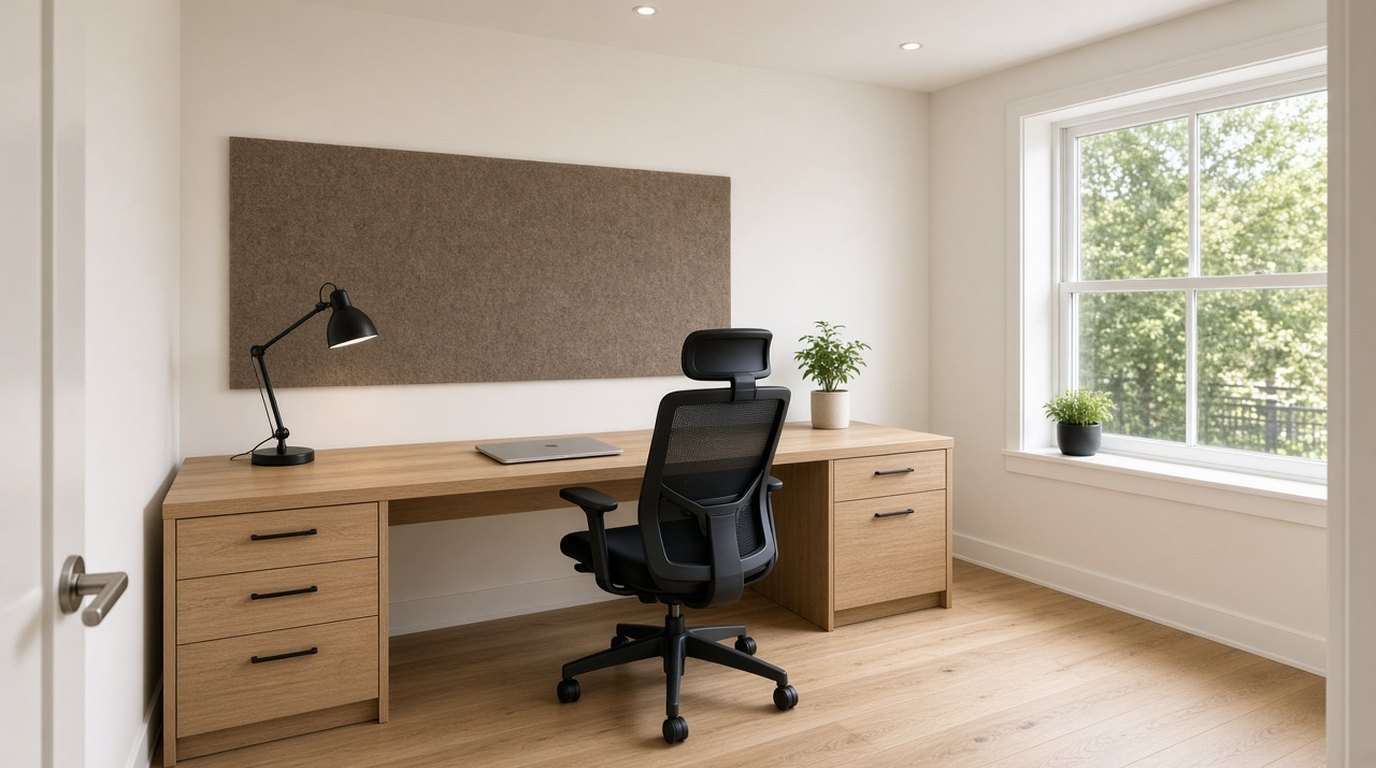
The home office isn’t a trend anymore. It’s a permanent feature of Canadian homes. Statistics Canada reports that over 4 million Canadians work from home at least part of the week, and that number hasn’t budged since 2023. If you’re still working from a kitchen table or a cramped corner of the bedroom, you’re overdue for a proper workspace.
A dedicated home office doesn’t need to be a full-room renovation. Some of the best setups I’ve designed occupy a single wall of an existing room. What matters is intention, the space needs to support focus, reduce fatigue, and look good on camera. Once the room exists, home office design ideas cover posture, lighting, and acoustics. The short focus list is home office design that actually helps you focus.
Why a Dedicated Workspace Matters
Working from a dining table or couch creates two problems. First, you never fully disconnect from work because your “office” is always visible. Second, your body pays the price, bad ergonomics from makeshift setups lead to back pain, neck strain, and eye fatigue.
A proper home office solves both. When you close the door (or step away from a well-defined zone), work is done. And when you’re working, everything is positioned to keep you comfortable and productive.
Choosing the Right Space
Full Room Conversion
If you have a spare bedroom, this is the ideal scenario. A 10x10 or 10x12 room gives you enough space for a desk, storage, and a small seating area for video calls or reading.
What to prioritize:
- A door that closes (critical for sound isolation and mental separation)
- At least one window for natural light
- Enough wall space for built-in shelving or storage
- Proximity to a bathroom so you’re not walking through the house during calls
Basement Office
Canadian basements offer a surprising advantage for home offices: they’re quiet. Below-grade rooms are naturally insulated from street noise and household activity. The trade-off is limited natural light, which you’ll need to compensate for with good artificial lighting.
For ideas on making your basement functional, see our Basement Renovation Guide for Winnipeg.
Closet Office (Cloffice)
For homes without a spare room, converting a closet into a compact workspace is one of the smartest small-space solutions. A standard 6-foot closet fits a 48-inch desk, floating shelves above, and task lighting, everything you need for focused work.
Remove the closet doors and replace them with a curtain or barn door that lets you hide the workspace at the end of the day.
Shared Room Setup
If your office shares space with a guest room, living room, or bedroom, define the workspace architecturally. A half-wall, a bookshelf used as a room divider, or a distinct flooring material creates visual separation.
For more strategies on making small spaces work harder, our Small Space Design Tips guide is worth a read.
Lighting for Home Offices
Lighting is the most overlooked element of home office design, and it’s the one that affects your productivity and energy the most.
Natural Light
Position your desk perpendicular to the window, not facing it or with it behind you. Facing a window creates glare and eye strain. Having a window behind you creates a backlit silhouette on video calls. Side lighting is the sweet spot, even illumination without glare.
If your office faces north (common in Canadian homes), you’ll get consistent, cool-toned light all day. This is actually ideal for focused work, no harsh glare, no shifting sun angles. But you’ll need to supplement with warm artificial light to prevent the room from feeling clinical.
Artificial Lighting
Layer three types of light:
- Ambient: A flush-mount ceiling fixture or recessed lights providing overall illumination
- Task: A desk lamp with adjustable brightness. LED lamps with colour temperature control (3000K to 5000K) let you shift from warm focus light to cool daylight as needed
- Accent: A shelf light, a wall sconce, or LED strip lighting behind the monitor reduces eye strain by eliminating the harsh contrast between a bright screen and a dark room
Check out our full Lighting Design Guide for room-by-room lighting strategies.
Soundproofing Your Home Office
Sound isolation matters whether you’re on video calls, concentrating on deep work, or just trying to block out the noise of a household.
Budget solutions ($100 to $500):
- Weatherstrip the door frame to seal gaps
- Add a door sweep to the bottom of the door
- Hang heavy curtains on windows
- Place a thick area rug on hard floors
- Add soft furnishings, upholstered chairs, cushions, fabric wall hangings
Mid-range solutions ($500 to $2,000):
- Replace a hollow-core door with a solid-core door ($200 to $500 installed)
- Add acoustic panels to walls (fabric-wrapped panels look better than foam)
- Install a bookshelf filled with books on a shared wall (mass blocks sound)
Professional solutions ($2,000 to $8,000):
- Add a second layer of drywall with Green Glue compound between layers
- Install resilient channel before the new drywall
- Upgrade to acoustic-rated windows
Desk and Ergonomics
Desk height: Standard desk height is 28 to 30 inches. If you’re using a fixed desk, make sure your elbows are at 90 degrees when typing. A sit-stand desk ($400 to $1,200) is one of the best investments you can make, alternating between sitting and standing reduces fatigue and back pain.
Monitor position: The top of the screen should be at or slightly below eye level, about an arm’s length away. If you use a laptop, get an external monitor or a laptop stand paired with an external keyboard.
Chair: This is the one item where you shouldn’t compromise on budget. A quality ergonomic chair ($500 to $1,200) pays for itself in comfort and health over years of daily use. Look for adjustable lumbar support, seat depth, armrests, and a mesh back for airflow.
Storage and Organization
Built-in shelving is the most efficient use of wall space. Floor-to-ceiling shelves on one wall provide storage for books, files, supplies, and decorative items without taking up floor space.
Cable management separates a professional-looking office from a cluttered one. Cable trays under the desk, adhesive cable clips, and a cable box on the floor hide the inevitable tangle of power cords and charging cables.
Closed storage is just as important as open shelving. A credenza behind the desk or closed cabinets within the built-ins keep supplies, paperwork, and tech accessories out of sight.
The Video Call Background
Remote work means your office doubles as a broadcast studio. What appears behind you on camera matters for professional perception.
What works:
- A bookshelf with a curated mix of books, plants, and a few objects
- A clean wall with one piece of art
- Visible plants (a tall fiddle leaf fig or a trailing pothos on a shelf)
- Warm, layered lighting
What doesn’t:
- A messy bed or unmade bedroom behind you
- A blank white wall (it reads as sterile and temporary)
- Harsh overhead lighting casting shadows under your eyes
- Windows behind you (backlit silhouette)
Budget Breakdown
Here’s what a home office renovation typically costs in 2026:
| Item | Cost Range |
|---|---|
| Sit-stand desk | $400 to $1,200 |
| Ergonomic chair | $500 to $1,200 |
| Built-in shelving | $1,500 to $5,000 |
| Lighting (layered) | $300 to $1,000 |
| Paint and finishing | $200 to $500 |
| Soundproofing (basic) | $100 to $500 |
| Flooring (if needed) | $500 to $2,000 |
| Total (mid-range) | $3,500 to $11,400 |
Design Styles That Work for Home Offices
Warm minimal: Clean lines, natural wood tones, white or warm grey walls, minimal decor. This style photographs well on camera and doesn’t distract.
Library study: Built-in bookshelves, a solid wood desk, leather chair, warm brass lighting. Rich and traditional without being heavy.
Scandinavian functional: Light wood, white walls, simple plants, functional furniture. Bright, calm, and highly practical for long work days.
Whatever style you choose, keep the colour palette restrained. Two or three colours maximum. The space should feel calm, not stimulating, you’re spending 8+ hours a day here.
Common Mistakes
Putting the desk against the wall. If you have the room, float the desk so you face into the room with the wall behind you. This is better for video calls and makes the room feel more intentional.
Skipping storage. Papers, cables, and supplies pile up fast. Build in storage from the start rather than adding it piecemeal.
Ignoring temperature. Home offices above garages, in basements, or in rooms far from the thermostat can run cold in winter or hot in summer. A small space heater or a ductless mini-split solves this.
Designing a home office? Georgia Home Design offers virtual consultations. I’ll help you plan a workspace that’s productive, comfortable, and looks great on camera. Book a consultation →